Premill abutment in exocad: milling from a blank
A premill abutment (preform, premilled blank) is a blank that already carries a precise, factory-machined implant connection interface, from which a custom abutment is milled. Working with a premill abutment in exocad differs from the standard protocol: you design only the structure above the fixed interface, not the whole part. Below we break down how a premilled blank library is built, how a preform differs from a Ti-Base, and how to go from blank to finished abutment without a bad fit.
What is a premill abutment and how does it differ from a Ti-Base?
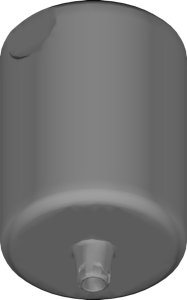
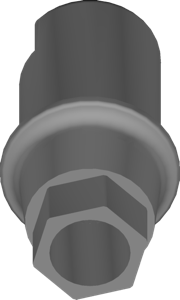
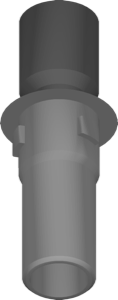
A premilled blank has two zones. The lower one is the precise seating interface (conical connection, hex or trilobe) plus an anti-rotation feature, manufactured at the factory to the implant maker's tolerances. The upper one is a cylindrical block of metal (titanium or CoCr) from which the CAM mill cuts the custom shape: angulation, emergence profile and margin height.
Unlike a Ti-Base, where you bond a crown or mesostructure onto a stock titanium base with fixed geometry, a preform yields a fully custom abutment from a single block. There is no cement joint in the connection zone, and the emergence profile is shaped for the specific case rather than adapted to a ready-made base.
- Premill / preform — mill a custom shape from a blank, factory interface;
- Ti-Base / titanium base — stock base, crown bonded on top;
- Stock abutment — fully prefabricated abutment with no milling.
How a premilled blank library works in exocad
A premilled blank library for exocad DentalCAD describes two things: the blank geometry (cylinder height, diameter, base) and the interface geometry that must not be altered. The software locks the lower zone during design — you cannot accidentally drop the abutment below the allowed level or grind away the anti-rotation.
Many libraries come in a local milling variant that specifies the holder the blank is fixed into in the mill. For example, Straumann Pre-milled Abutment AG Holder local milling contains the Straumann preform geometry specifically for local milling in the lab. It is important to download the library for your holder type — AG, Medentika and other variants are not interchangeable.
How to mill a custom abutment from a blank
The workflow from preform to finished part comes down to a few steps:
- Install the premilled blank library in exocad and select the right blank by brand, platform and height;
- Design the custom abutment: angulation, emergence profile, margin, anti-rotation (where the design allows it);
- Check that the abutment body fits within the available cylinder volume — the software will highlight any overshoot;
- Export to CAM with the correct alignment to the blank holder;
- Mill it, remove it from the holder, polish, and check the fit on the analog.
The blank height sets the maximum of what you can build. Ranges such as Megagen AR Cust Abt 13mm state the block height directly (13 mm), and for low clinical heights you pick a smaller blank so you don't waste excess metal.
Titanium or CoCr: choosing the blank material
Preforms come in two main materials. Titanium (Ti) is the standard for single abutments and mesostructures — biocompatible and well-behaved in the gingival zone. CoCr (cobalt-chromium) is more common for frameworks and bar constructions where stiffness is needed.
The catalog reflects this right in the name: for example, Dentsply Sirona Pre-milled blanks Straumann BLX Ti is a titanium blank for the BLX connection, while the parallel CoCr versions of Ankylos CX, Neodent and Megagen are for metal frameworks. The blank material determines both the milling parameters and holder compatibility, so you should pick the library for a specific block.
How to choose a preform library for your system
Start from three parameters: implant brand and connection, blank type (Ti/CoCr, high/low), and the mill's holder system. For the same implants there are preforms from different block makers — original and compatible.
For MIS C1, for instance, there is MIS AQs-Premilled MIS-C1I from NewAncorvis, plus Dentsply Sirona AtlantisFLO and DESS versions. For the brand's own blanks, Sweden & Martina Premilled Abutment fits. Camlog and CONELOG are covered by separate CAM ti-blank and CoCr-blank libraries of the IAC/ME type with 6-cam indexing — they are not mixed with one another.
All the premilled blank libraries listed here for exocad DentalCAD are available in the DentalLibs catalog — filter by implant brand and the word premilled so you don't install a library for the wrong holder.
Frequently asked questions about premill abutments in exocad
How does a premill abutment differ from a Ti-Base?
A preform is a blank from which the entire custom abutment is milled, with a factory interface at the bottom. A Ti-Base is a stock base onto which a crown or mesostructure is bonded on top.
Can you mill a preform with a regular implant library?
No. You need a premilled blank library specifically — it describes the blank geometry and locks the connection zone. A regular library has no data about the block and holder.
Why does the holder type matter?
The holder defines how the blank is aligned in the mill. AG Holder and Medentika Holder libraries are not interchangeable — with the wrong choice the abutment will be milled off-position.
How do you choose the blank height?
By the clinical height of the abutment. The blank must cover the required body height; excess volume simply becomes swarf, while insufficient height makes the design impossible.