Keystone Dental: Genesis and Prima Libraries for exoplan
Keystone Dental Group is a US manufacturer that has brought several independent implant lines together under one brand: Genesis, Prima Plus and the Paltop family. So when you search for a keystone dental library for exoplan, you are not looking at a single file but at several systems with different connection geometries and their own surgical kits.
In the DentalLibs catalog, Keystone libraries are organized by system and by purpose: separate ones for planning the implant position and separate ones for generating a surgical guide for a specific set of drills and sleeves. Below we break down what each does and how to avoid mixing up the lines when choosing.
Keystone Dental Group: which implant systems are inside the brand
Before you download a library, it helps to know exactly which Keystone system you are working with. The connection and drilling protocol differ across the lines, and a Genesis file will not fit Prima Plus.
- Genesis — the base line with a conical connection, supported by the Genesis Guided surgical protocol.
- Prima Plus — an evolution of the Prima platform, positioned for immediate placement and high primary stability.
- Paltop — the Advanced Classic, Advanced+, Dynamic and Conical Active (PCA) lines that came to Keystone along with the Paltop brand.
- Genesis Active — a version with an active thread, found in RealGUIDE libraries.
Keystone Genesis library for exoplan
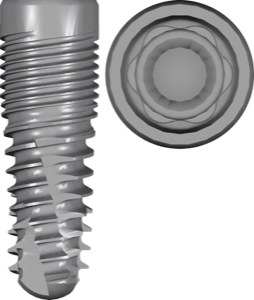
For planning, use Keystone Genesis plan — an implant library with implant models for positioning in the project. The fda tag means the item is on the list of FDA-cleared systems, a handy reference when working with US protocols.
For exoplan to generate a correct surgical guide, the planning library also needs a surgical one: Keystone Genesis kit. It is built on the Genesis Guided Surgical Kit and contains the geometry of sleeves and drills for fully guided surgery.
Keystone Prima Plus: planning and guided surgery
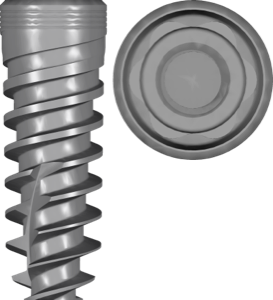
Prima Plus is built on the Prima platform and is often used for immediate implant placement. For positioning in the project, take Keystone Prima Plus plan — it sets the correct shape and apical portion of the implant for planning.
A separate library for the Prima Plus Guided Surgery Kit is used for the guide. It contains the sleeve parameters and drilling sequence for the Prima Plus guided protocol, so the guide's offsets match the actual kit in the clinic.
The logic is the same as with Genesis: a split between planning and the surgical kit. You cannot mix kits from different systems — the drilling protocols differ.
Paltop within Keystone: Conical Active, Advanced, Dynamic
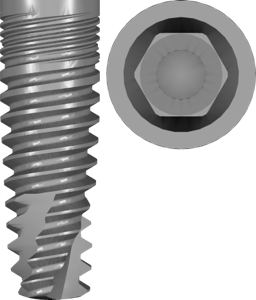
The Paltop family is the broadest layer in the Keystone libraries. In exoplan you have Advanced Classic, Advanced+, Dynamic and Paltop Conical Active. Take the latter as Keystone Paltop PCA plan — a line with a conical active connection designed for planning with guided components.
For Paltop guides there are separate surgical libraries: Paltop Fully Guided kit for the fully guided protocol and Paltop Pilot kit for pilot drilling through the guide, when full navigation is not needed.
- Paltop Advanced Classic — the classic Paltop platform.
- Paltop Advanced+ — the updated version of Advanced.
- Paltop Dynamic — the Dynamic line.
- Paltop Conical Active (PCA) — a conical active connection.
Keystone libraries for RealGUIDE
If you plan in a different environment, there is a Keystone library for RealGUIDE. It brings together components for planning and surgical guides across several Keystone Dental Group systems at once — Genesis Active, Prima Plus and Paltop.
This is handy when the lab works in RealGUIDE while the surgeon uses different Keystone lines: you won't have to collect files one system at a time. The selection logic is still the same — what matters is the specific implant platform, not just the brand.
How to install a Keystone library in exoplan
The planning and guide libraries are placed into the corresponding folders in exoplan, after which the system appears in the list when selecting an implant and when generating a guide. If the project lacks the right kit, exoplan won't provide correct sleeve offsets — this is the most common reason a guide "won't build."
At the prosthetics stage, separately check compatibility with the Ti-Base (titanium base): the prosthetic shapes are taken from the exocad DentalCAD libraries and tied to the platform of the specific Keystone system, not to the planning file. Also pay attention to the scanbody connection type — engaging (with anti-rotation) or non-engaging (without it).
All the listed Keystone libraries for planning and guided surgery are available in the DentalLibs catalog — for the Genesis, Prima Plus and Paltop systems.
Frequently asked questions about Keystone Dental libraries
What is the difference between a plan library and a kit library for Keystone?
The plan sets the implant shape for positioning in the project, the kit contains the sleeve and drill geometry for generating the surgical guide. You need both for a printed guide.
Are there Keystone libraries for RealGUIDE?
Yes. The Keystone library for RealGUIDE brings together components for Genesis Active, Prima Plus and Paltop for planning and working with guides.
What does fda in the Keystone Genesis library name mean?
It's a tag indicating the system is on the list of FDA-cleared systems. It serves as a reference when choosing, but does not change the implant geometry in the plan.
Will one Keystone library work for all of the brand's systems?
No. Genesis, Prima Plus and Paltop have different connections and drilling protocols. Choose a library for the specific system and platform.