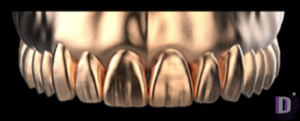
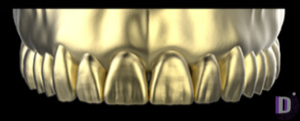
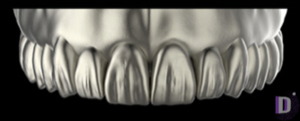
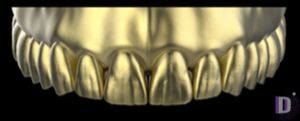
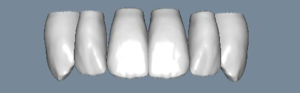
Expression V2 for exocad: choosing a tooth character
When you start a crown design in exocad, the software doesn't sculpt the tooth from scratch — it takes reference morphology from an anatomy library (tooth anatomy library) as a starting point. Expression is one of the most sought-after such ranges for exocad, and the choice of its "character" is exactly what decides whether the restoration turns out young and textured or restrained and aged.
In this article we'll break down what's behind names like Expression V2, V3 or U1, how the V, U, T and S series differ, and how to pick the right anatomy for a specific clinical case — without guessing and without redundant reworks in DentalCAD.
What are Expression anatomy libraries in exocad
An anatomy library is a set of reference tooth shapes (reference morphology) that DentalCAD uses as the starting geometry when building crowns, bridges and full-contour restorations. The software adapts that shape to your preparation, antagonists and adjacent teeth, but the original "donor" sets the style: cusp height and sharpness, fissure definition, surface texture and overall proportions.
In the DentalLibs catalog, the exocad anatomy section holds 444 libraries, and Expression makes up a notable share of it. The range is built on a "character" logic: the same geometric school, but with varying degrees of surface texture, which is handy when you need to switch quickly between young and aged cases.
Expression letters and numbers: how to read V, U, T, S, O, P, G, D
Each library name is made of a character letter and a variant number. The letter denotes a family of morphologies with its own signature, and the number denotes a variation within it, most often by degree of texture and age nuance.
- V series (V1–V3) — expressive character; V3 is the most textured variant of the family;
- U series (U1–U3) — universal shapes; U1 is designed for a broad range of cases;
- T series (T1–T3) — from crisp, pronounced morphology to a mature, slightly worn one (T3);
- S series (S1–S3) — restrained character; S3 stands out with softened cusp texture;
- O, P, G, D — additional families with their own signature to broaden the choice.
The manufacturer doesn't publish precise "spec sheet" values for each number, so rely on the visual preview and the description of a specific library rather than on the formal numbering.
Expression V2 and the V series: how V1, V2, V3 differ
The V series is the workhorse of the range for esthetic anterior and premolar restorations. Expression V2 gives balanced, expressive texture: a surface lively enough that the restoration doesn't look "plastic," but without the aggressive texture that's hard to reproduce when milling thin ceramics.
If you need a richer character — with deeper fissures and pronounced cusps — look toward Expression V3, the most expressive member of the V series. V1, on the contrary, is calmer and suits cases where you want to stay within the V style but tone down the texture.
How to choose a tooth character for the patient
Choosing Expression maps neatly onto three variables: patient age, restoration zone and the overall style of adjacent teeth. Young teeth have sharp cusps, pronounced mamelons and lively texture — textured V and T series variants suit them. With age the texture smooths out and enamel wears down — here mature, slightly worn shapes like Expression T3 make more sense.
When there's no reference or the case needs to be closed quickly and predictably, take a universal morphology — for example, Expression U1: it fits a broad range of situations and serves well as a base you then edit manually. For the posterior group, a correct occlusal scheme matters more than texture esthetics, so overly textured characters are often excessive there.
- Young patient, anterior and premolars — pronounced texture (V2/V3);
- Aged case, worn occlusion — mature shapes with soft texture (T3, S series);
- No clear reference or tight deadlines — universal character (U1);
- Posterior group — occlusion priority, moderate texture.
Expression or signature libraries: Pogarskiy, Zirkonzahn, FOBOS
Expression isn't the only option. Alongside it in the catalog sit signature and branded anatomy libraries with their own handwriting. Pogarskiy Design 2.0 is a second-generation signature range with reworked morphology that technicians pick for its recognizable style. zirkonzahnTRITON offers a stronger, "masculine" texture, while FOBOS-Pallada and the Lorant Stumpf sets add a few more sculptural characters.
The difference between Expression and signature sets is predictability versus individuality. Expression is systematic and scales easily across cases; signature libraries more often win where you need a specific recognizable style or a heavily textured surface. All of these anatomy libraries are available in the DentalLibs catalog, so it makes sense to keep both a systematic range and a couple of signature ones "for character" on hand.
How to assign an Expression library in DentalCAD
Anatomy files are unpacked into the exocad libraries folder (usually the tooth libraries section inside the installed DentalCAD version), after which the range appears in the morphology selection list in the design project. You can assign the character at the tooth anatomy selection stage — before the automatic shape build, so exocad builds the crown from the right "donor" straight away.
You can also change the library mid-work, but then part of the manual shape edits will have to be redone. So decide on the character at the start of the case, not at the finish.
Frequently asked questions about Expression libraries for exocad
How does Expression V2 differ from V3?
Both are from the V series with the same signature, but V3 is the most textured variant with more pronounced cusps and fissures. V2 is balanced and serves as a neutral starting point.
Which Expression should I take if there's no clear reference?
A universal morphology like U1: it suits a broad range of cases and is convenient as a base for manual refinement.
Does the choice of anatomy library affect crown fit?
No. The library sets the initial character of the shape, while the fit is determined by the preparation, gaps and design parameters in exocad.
Can I change the tooth character in the middle of a project?
Yes, but part of the manual shape edits will have to be redone. It's better to choose the library at the start of the case.