exocad Morphology Libraries: 444 Designer Styles
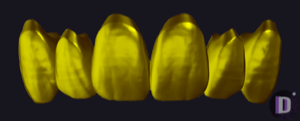
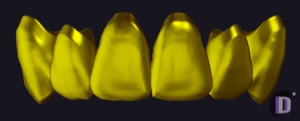
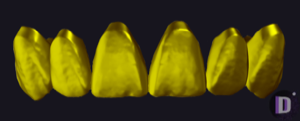
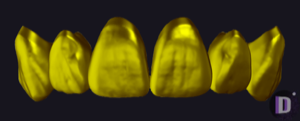
Anatomical libraries are the most underrated part of the catalog. DentalLibs has 444 of them, and almost none is an implant brand — each is an author's school of morphology. It defines how the finished restoration will look: the relief of the occlusal surface, the shape of the marginal ridge, the character of the incisal edge. Morphology libraries for exocad are a set of reference teeth (master tooth / reference shape) that the engine loads as the starting geometry when modeling crowns, bridges and full-anatomy work.
Let's look at the three lines technicians run into most often: Lorant Stumpf, DTLab and Grin Design. The first two are widely represented in the catalog, the third sets a recognizable esthetic style. The goal is to understand how tooth morphology differs between authors and when to load which one.
What an anatomical library is and how morphology works in exocad
In exocad DentalCAD every crown starts from a reference shape. You can rely on BioGeneric, or you can assign a specific reference tooth from an anatomical library — then the software takes the author's morphology as the base and adapts it to the preparation, the antagonist and the neighboring teeth. With TruSmile enabled, the shape already looks natural in the preview.
Libraries come in two types. Some contain a whole coordinated arch of teeth (a full upper/lower set), others a single tooth for a specific FDI position. For example, in the Lorant Stumpf series individual numbers are tied to specific units: Lorant Stumpf 13 is the upper left central incisor, while Lorant Stumpf 18 is the upper left first molar.
- coordinated set — when you model several units in one style;
- single tooth — when you need a single crown with the exact anatomy of a position;
- author's style — sets the 'signature': aggressive or smoothed relief.
Lorant Stumpf style: natural anatomy for the esthetic zone
The Lorant Stumpf series is arguably the most recognizable school of morphology in exocad. The libraries are numbered from 01 to 20 and cover both full sets and individual maxillary units. Stumpf's signature is pronounced natural texture: mamelons on the incisors, a lively incisal edge, neat marginal ridges without the 'plastic' smoothness.
A number of the entries are tied to specific teeth in the upper left quadrant: the lateral incisor, the canine (Lorant Stumpf 15), the first and second premolars, the first molar. That is handy when you model the anterior and need a predictable, refined shape without hand-finishing every fissure.
The style sits well in the esthetic zone — veneers, single incisors, restorations within the smile. For older patients, sets with a more smoothed relief work well; for younger ones, sets with pronounced mamelons and enamel texture.
DTLab: universal functional morphology for high volume
DTLab is a large series (numbers roughly from 0 to 28) built for daily volume: crowns, bridges, full-anatomy monolithics. Here the focus shifts from artistic texture to function and manufacturability. DTLab morphology gives a controlled occlusal surface, which simplifies milling and reduces the amount of finishing after seating.
Libraries such as DTLab.3 and DTLab.19 contain coordinated sets of shapes that fit the arch cleanly. This is the workhorse for posterior teeth and long-span bridges, where a stable fissure-cusp system matters more than individual enamel texture.
Grin Design and other schools: how a designer's signature differs
Grin Design is the school associated first and foremost with smile design and the esthetic protocol. Its morphology leans toward a young, 'glossy' anterior: crisp transition lines, expressive incisor shape, a well-planned visual harmony of the arch. That style is in demand for work focused on the appearance of the smile.
The general principle for choosing between schools is simple: an anatomical library is not about compatibility, it's about the character of the shape. The same tooth 21 in the Lorant Stumpf, DTLab and Grin Design styles will differ in texture, relief and the line of the incisal edge. So it makes sense to keep several libraries on hand and switch them by type of work.
- anterior and esthetics — natural texture (Lorant Stumpf);
- posterior region and high-volume bridges — functional sets (DTLab);
- smile design and presentation work — expressive esthetic signature (Grin Design).
How to choose a morphology library for a clinical case
Start from three factors: zone (anterior or posterior), material (monolithic or for layering) and patient age. For a single anterior incisor, take a single tooth from an esthetic series — for example Lorant Stumpf 13 for position 21. For a long-span posterior bridge, a coordinated functional set makes more sense.
Installation is simple: the library unpacks into the folder with exocad anatomical data, after which the style appears in the reference tooth dropdown when you start modeling. There are no connection or platform settings here — it's pure tooth geometry.
All three schools — Lorant Stumpf, DTLab and Grin Design — are available in the anatomical libraries section of the DentalLibs catalog. Start with one series for your main type of work and gradually add alternative styles for non-standard cases.
Frequently asked questions about exocad anatomical libraries
Does the choice of anatomical library affect implant compatibility?
No. An anatomical library only defines the tooth shape (morphology). Implant compatibility is determined by the connection and Ti-Base libraries, not the crown style.
What's the difference between Lorant Stumpf and DTLab?
Lorant Stumpf — natural texture and relief for the esthetic zone. DTLab — functional, manufacturable shapes for high-volume crowns and bridges, where predictable occlusion matters.
Can you use several morphology libraries in one project?
Yes. You can assign a separate reference tooth to each unit, so you can model the anterior in one style and the posterior teeth in another.
How do you install an anatomical library in exocad?
Unpack the files into the DentalCAD anatomical data folder. After a restart the style appears in the reference tooth list when you start modeling.