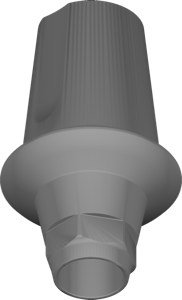
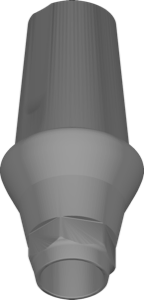
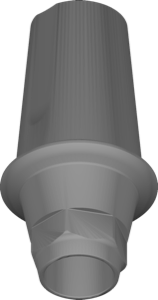
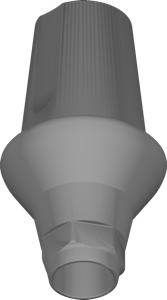
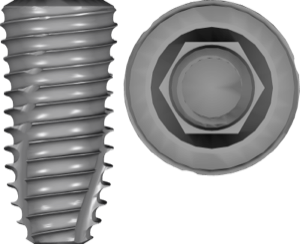
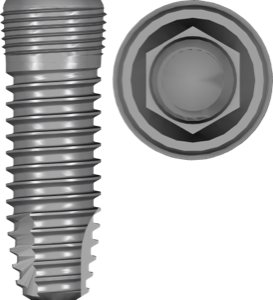
Dentium SuperLine library exocad: Ti-Base Link, 4 positions
If you model crowns on Dentium implants in exocad, it all starts with the right library. The search query dentium superline library exocad leads to the Ti-Base Link set — libraries where the titanium base geometry is split by implant position. Below we break down how positions 4505, 4515, 5510 and 5520 differ, how the SuperLine connection relates to Implantium and SuperLine II, and which libraries you need separately for planning in exoplan.
Confusion here is costly: the wrong platform or Ti-Base height means a redo at the milling stage, not a minor tweak in CAD.
What is Dentium SuperLine and why the Ti-Base Link library matters
SuperLine is a Dentium implant system with an SLA surface, a conical internal hex and platform switching. For the digital workflow, what matters is not the implant itself but its prosthetic interface — and that is exactly what the library describes.
Ti-Base (titanium base) is the component to which a milled zirconia or PMMA restoration is bonded. The Link part of the name refers to the geometry of the connection between the base and the implant: the seating, the anti-rotation feature and the height. The Ti-Base Link library in exocad DentalCAD loads this geometry so that CAD correctly builds the screw channel, the bonding zone and the emergence profile.
Ti-Base Link libraries: positions 4505, 4515, 5510, 5520
In the DentalLibs catalog, the Ti-Base Link set for SuperLine is split into four positions. The numeric code in the name corresponds to the fixture's size combination (diameter and length) — pick the library strictly for the implant placed in the patient's mouth.
- SuperLine Ti-Base Link 4505 — position 4505;
- SuperLine Ti-Base Link 4515 — position 4515;
- SuperLine Ti-Base Link 5510 — position 5510;
- SuperLine Ti-Base Link 5520 — position 5520.
Each library contains the Ti-Base and Link geometry, ready to use in exocad DentalCAD. If you are unsure of the position, check the implant passport or the surgical protocol — the size code on the SuperLine packaging matches the code in the library name.
SuperLine, SuperLine II and Implantium: how the connections differ
Dentium makes several lines, and they are easy to mix up when picking a CAD library. SuperLine is the base system with a conical internal hex. SuperLine II has a unified prosthetic platform and FDA clearance for the US market. Implantium is an earlier Bone Level system from Dentium.
For planning in exoplan the lines come as separate libraries: Dentium SuperLine plan and Dentium Implantium plan (FDA). There are also SuperLine II and Implantium II versions — watch the suffix, because the prosthetic interface can differ between generations.
exocad DentalCAD or exoplan: which libraries for what
Ti-Base Link are libraries for exocad DentalCAD, that is, for the prosthetic stage: modeling crowns and small bridges on a titanium base. The exocad-implant section of the catalog holds 1058 entries, and Dentium is well represented there.
For guided surgery you need different libraries — from exoplan (1271 entries). Planning the implant position relies on plan libraries, while making the guide relies on surgical kits with sleeves. For Dentium these are the Digital50 kit, Full Digital kit and Digital Simple kit.
Do not confuse these two layers: a prosthetic Ti-Base library is not suitable for planning, and a sleeve library does not describe the base geometry for a crown. For a full SuperLine digital workflow you will need both parts.
SuperLine abutments and surgical kits in the catalog
Besides Ti-Base Link, other prosthetic components are available for SuperLine in exocad DentalCAD. Custom abutments come in SE and SW variants (Custom Abutment SE/SW). For screw-retained fixation there is Screw Abutment Ext in 4.5 mm and 5.5 mm sizes — for multi-unit and angled situations.
Related Dentium lines — NR Line and SimpleLine II — also have their own abutment libraries, so when switching between systems always double-check that the library for the right line is selected, not a neighboring one.
All the listed libraries — Ti-Base Link, abutments and surgical kits — are available in the DentalLibs catalog with the line and position specified, which lowers the risk of installing the wrong geometry.
FAQ about Dentium SuperLine libraries for exocad
How do I choose a Dentium SuperLine library for exocad?
Identify the line (SuperLine, SuperLine II or Implantium) and the implant's size position — the code on the package matches the Ti-Base Link library code (4505, 4515, 5510, 5520).
How does Ti-Base Link differ from a plan library?
Ti-Base Link is the prosthetic base geometry for exocad DentalCAD. A plan library is needed in exoplan to plan the implant position. These are different stages and different files.
Can I use a SuperLine library for Implantium?
No. These are different Dentium systems with a different prosthetic interface. For Implantium, use a separate Implantium or Implantium II library.
What do the numbers 4505 or 5510 in the name mean?
It is the size code of the SuperLine implant position — a combination of the fixture's diameter and length. Choose the library strictly for the implant that was placed.