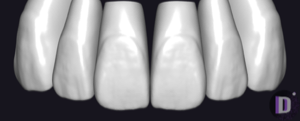
RAINBOW exocad anatomy library
4 libraries · exocad DentalCAD — Tooth Anatomy
RAINBOW — 4 libraries for exocad DentalCAD — Tooth Anatomy in the catalog.
RAINBOW is a tooth morphology library line for exocad DentalCAD, offering distinct reference shapes for designing crowns, bridges and full-anatomy restorations. The catalog contains 4 RAINBOW libraries, including RAINBOW 20 Orange and the RAINBOW 40 Green Original and RAINBOW 40 Green Triangular variants.
Each set provides a defined morphology that technicians can load as a reference tooth when building digital restorations in the DentalCAD design environment.
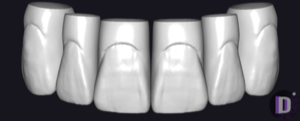
RAINBOW
RAINBOW 40 Green Triangular
Triangular tooth anatomy library, reference morphology for crowns and restorations in exocad.
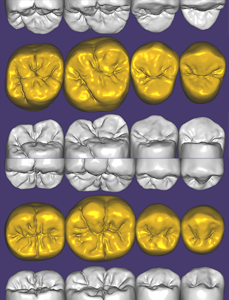
RAINBOW
RAINBOW
Tooth anatomy library for exocad: reference morphologies for crowns, bridges, restorations.
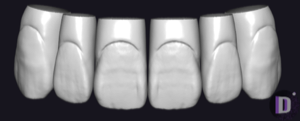
RAINBOW
RAINBOW 40 Green Original
Tooth anatomy library, Green morphology, for crowns, bridges, restorations in exocad.
Nothing found
FAQ — RAINBOW
How do I install a RAINBOW library in exocad DentalCAD?
After signing in, click the Download button to receive the file. Unzip the archive and place the library folder into the exocad DentalCAD tooth library directory, or add it through exocad Library Manager. Restart DentalCAD so the new RAINBOW morphology set appears among the available reference teeth.
How many RAINBOW libraries are in the catalog?
The catalog contains 4 RAINBOW libraries, including RAINBOW 20 Orange, RAINBOW 40 Green Original and RAINBOW 40 Green Triangular.
What are RAINBOW libraries used for in DentalCAD?
They provide reference tooth morphologies that DentalCAD uses as a starting shape when designing crowns, bridges and full-anatomy restorations. The technician picks a RAINBOW set, and its tooth forms are applied as the anatomical template for the digital restoration.
What format are RAINBOW libraries delivered in?
Each RAINBOW library is delivered as a ZIP archive ready for exocad DentalCAD. After extracting the archive, the library folder is placed in the DentalCAD tooth library directory or imported through exocad Library Manager.