Nondas
Nondas Vlachopoulos
Authored tooth anatomy library for exocad DentalCAD: crowns, bridges, full-anatomy restorations.
2 libraries · exocad DentalCAD — Tooth Anatomy
Nondas — 2 libraries for exocad DentalCAD — Tooth Anatomy in the catalog.
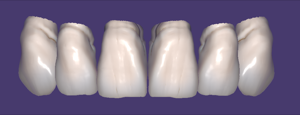
The Nondas hub offers two exocad DentalCAD tooth anatomy libraries authored by Nondas Vlachopoulos, listed in the catalog as Nondas and Nondas Vlachopoulos. These morphology sets provide reference tooth shapes that dental technicians use inside DentalCAD as a starting form when designing full-anatomy crowns, bridges and monolithic restorations, adapting the base morphology to the individual clinical situation and occlusion.
Authored tooth anatomy library for exocad DentalCAD: crowns, bridges, full-anatomy restorations.
Authored tooth anatomy library for exocad DentalCAD: source morphologies, crowns, bridges, restorations.
This library is part of PRO. Access opens downloads for all 2,983 libraries.