Matt Roberts
matt roberts
Tooth anatomy library for exocad: reference morphologies for crowns, bridges, restorations.
3 libraries · exocad DentalCAD — Tooth Anatomy
Matt Roberts — 3 libraries for exocad DentalCAD — Tooth Anatomy in the catalog.
The Matt Roberts hub presents tooth-anatomy libraries for exocad DentalCAD developed with master dental technician Matt Roberts, a recognized educator in restorative and aesthetic design. Three lines are available — el_MatRoberts, elmat and matt roberts — each capturing his characteristic morphology with refined anterior anatomy and natural surface detail.
In DentalCAD these sets are used as reference shapes when designing crowns, bridges and full-anatomy restorations, supporting a predictable aesthetic outcome.
Tooth anatomy library for exocad: reference morphologies for crowns, bridges, restorations.
Reference tooth anatomy library for modeling crowns and bridges in exocad.
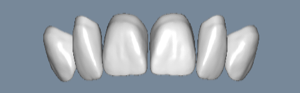
Tooth anatomy library for exocad: reference shapes for crowns, bridges, monolithic restorations.
This library is part of PRO. Access opens downloads for all 2,983 libraries.