Ivoclar
IVOCLAR-S72
Anatomical tooth library, S72 morphology, reference for crown and bridge modeling in exocad
2 libraries · exocad DentalCAD — Tooth Anatomy
Ivoclar — 2 libraries for exocad DentalCAD — Tooth Anatomy in the catalog.
The Ivoclar hub in our exocad DentalCAD catalog gathers two tooth-anatomy reference libraries — IVOCLAR-S72 and IVOCLAR-S82 — built around established Ivoclar tooth-form lines and prepared for use as morphology templates inside DentalCAD. Each set supplies a coherent vocabulary of anterior and posterior shapes that CAD technicians load as a starting form when designing crowns, bridges and full-anatomy restorations.
With both Ivoclar lines in one place, the hub makes it easy to compare the S72 and S82 morphologies and pick the best fit for the case.
Anatomical tooth library, S72 morphology, reference for crown and bridge modeling in exocad
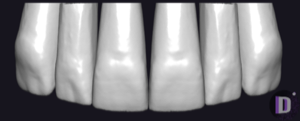
Anatomical tooth library for exocad DentalCAD: reference morphology for crowns, bridges, restorations.
This library is part of PRO. Access opens downloads for all 2,983 libraries.