Hilton
Hilton Riquieri
Tooth anatomy library for exocad with morphologies for crowns, bridges, restorations.
3 libraries · exocad DentalCAD — Tooth Anatomy
Hilton — 3 libraries for exocad DentalCAD — Tooth Anatomy in the catalog.
The Hilton hub on our exocad DentalCAD catalog presents three tooth-anatomy libraries signed by Hilton Riquieri — the base Hilton Riquieri set alongside the N1 and N2 variants. Together they give CAD technicians a family of related morphologies that can be loaded as reference shapes when designing crowns, bridges and full-anatomy restorations.
The N1 and N2 lines offer subtle alternative readings of the same author's tooth forms, so designers can match the reference to the aesthetic and functional demands of each case.
Tooth anatomy library for exocad with morphologies for crowns, bridges, restorations.
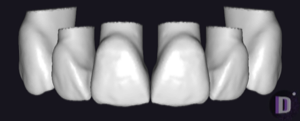
Authorial tooth anatomy set for exocad DentalCAD: shapes for crowns, bridges, restorations.
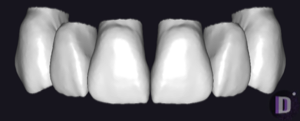
Anatomical tooth library for exocad with reference morphology for crowns, bridges, full-anatomy restorations
This library is part of PRO. Access opens downloads for all 2,983 libraries.