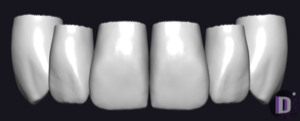
Culp exocad anatomy library
2 libraries · exocad DentalCAD — Tooth Anatomy
Culp — 2 libraries for exocad DentalCAD — Tooth Anatomy in the catalog.
The Culp tooth anatomy library brings the Culp morphology sets into exocad DentalCAD, offering reference tooth shapes for designing crowns, bridges and full-anatomy restorations. The catalog includes 2 lines — Culp-Mature and Culp-Young — each capturing a distinct age-related character, from fuller, worn mature contours to the crisp anatomy of young teeth.
Loaded as a reference in DentalCAD, these morphologies guide the design so the final restoration mirrors the Culp aesthetic.
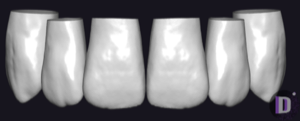
Culp
Culp-Young
Tooth anatomy library with young-arch morphology: pronounced cusps, mamelons, for exocad.
Nothing found
FAQ — Culp
How do I install a Culp library in exocad DentalCAD?
After signing in, click the "Download" button to receive the file directly. Unzip the archive and place the library folder into the exocad DentalCAD tooth library directory, or add it through the exocad Library Manager, then restart the program so the new morphology set appears.
How many Culp libraries are in the catalog?
The catalog contains 2 Culp tooth anatomy sets — Culp-Mature and Culp-Young — covering two age-related morphological profiles for use as reference shapes in DentalCAD.
What are Culp libraries used for in DentalCAD?
They supply reference tooth morphology that DentalCAD uses to shape crowns, bridges and full-anatomy restorations. The Culp-Mature and Culp-Young sets let you match the restoration's surface texture and contour to the patient's age group and aesthetic.
What format do Culp libraries come in?
Each Culp library is delivered as a ZIP archive ready for exocad DentalCAD. After extracting the archive, the folder can be placed in the tooth library directory or imported through the exocad Library Manager.