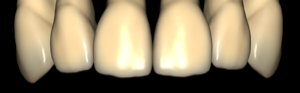
Brenes
Brenes-Elchi Round
Tooth anatomy library with rounded morphology, reference for crowns and restorations in exocad.
3 libraries · exocad DentalCAD — Tooth Anatomy
Brenes — 3 libraries for exocad DentalCAD — Tooth Anatomy in the catalog.
The Brenes hub collects tooth anatomy libraries for exocad DentalCAD, providing reference morphologies for designing crowns, bridges and full-anatomy restorations. The catalog currently lists 3 Brenes lines, including Brenes-Elchi Round, Brenes-Elchi Square and Brenes-Elchi Square Round, each offering a distinct facial-form character that technicians apply as a starting shape when building restorations in the DentalCAD workflow.
Tooth anatomy library with rounded morphology, reference for crowns and restorations in exocad.
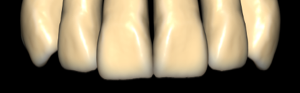
Tooth anatomy library with square morphology, reference for crowns and restorations in exocad.
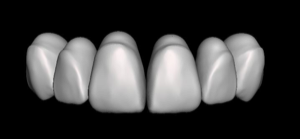
Hybrid tooth anatomy library, square silhouette with rounded transitions, for exocad.
This library is part of PRO. Access opens downloads for all 2,983 libraries.