ashortia
ashortia+
Extended tooth anatomy library for exocad, reference for crowns, bridges, full-anatomy restorations.
2 libraries · exocad DentalCAD — Tooth Anatomy
ashortia — 2 libraries for exocad DentalCAD — Tooth Anatomy in the catalog.
The ashortia hub gathers tooth-anatomy libraries for exocad DentalCAD by dental designer ashortia. The collection includes two morphology lines — ashortia and ashortia+ — offering reference tooth shapes with a natural, layered character for anterior and full-anatomy work.
Loaded into DentalCAD, these sets act as reference morphology when designing crowns, bridges and monolithic restorations, giving the technician a consistent anatomical starting point for single units and larger arch cases.
Extended tooth anatomy library for exocad, reference for crowns, bridges, full-anatomy restorations.
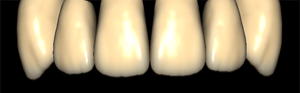
Author tooth anatomy library for exocad, morphology reference for crowns and restorations
This library is part of PRO. Access opens downloads for all 2,983 libraries.